
WordPress 7 has been available since May 20, 2026. This update does not change everything overnight, but it does bring several useful improvements to your publishing workflow.
1. A new Icon block
WordPress 7 introduces a new Icon block. It makes it much easier to add an icon to a page, without having to find an image and upload it to your media library. Simply type /icon to choose from a library of around one hundred icons. It also offers plenty of customization options: you can adjust the size, color, background color, and border.
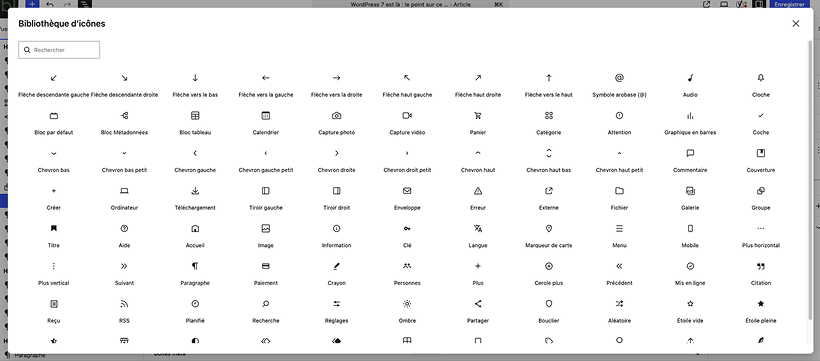
From an eco-design perspective, this is excellent. The icon is embedded as an .svg, with the code placed directly in the page, making it a very lightweight solution that will not weigh your pages down.
2. A new Breadcrumb block
The Breadcrumb block lets you display a page’s navigation path, for example: “Home » Our plugins » Inblock Smooth Blocks”. For visitors, it provides a simple point of reference. It helps them understand where they are within the site, especially when a page is accessed from a search engine or a shared link. Plugins already made it easy to add breadcrumbs, but it is a standard feature that is welcome to have built in, without needing an extra plugin.
3. A simpler Heading block
WordPress 7 brings a few changes and improvements to the Heading block. The different heading levels — H1, H2, H3, and so on — are no longer separate blocks, but variations of the same “Heading” block, which makes it easier to switch from one level to another.
4. A new option to hide a block on mobile
WordPress 7 adds a visibility option that lets you hide a block on desktop, tablet, or mobile. Hiding certain elements depending on the screen size is often useful: it can lighten mobile pages and allow for more precise control over the layout. Until now, this required custom CSS or a dedicated plugin. It is now available as a simple option on each block.
Beyond simply hiding an element, you can now create two different versions of the same block and hide one on desktop while hiding the other on mobile, giving you layouts that are genuinely tailored to each device.
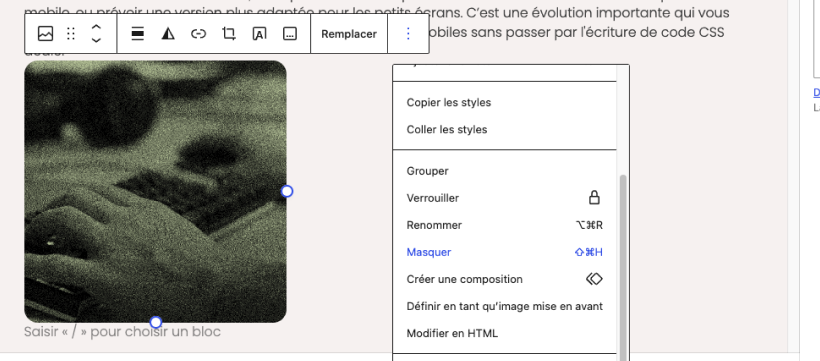
From an eco-design perspective, this is very good news. You can now truly adapt the output to the user’s device and, for example, replace heavy images with lighter versions specifically for mobile.
5. The Cover block can now include a video
The Cover block can now include a video, making it possible to create full-width sections with background videos.
From an eco-design perspective? We will of course avoid that.
6. More customizable dropdown menus
WordPress 7 now allows you to customize the dropdown menus that appear when clicking or hovering over a navigation item. Once again, this is something you almost always want to customize, and until now it required writing specific CSS code. It is now possible directly in the block editor through Overlay Templates.
The Navigation block has also gained a few new options, making it easier to fine-tune navigation on mobile.
7. A structure ready for AI
WordPress 7 lays the groundwork for better integration with artificial intelligence services. In the Settings menu, you will now find a new Connectors entry, which allows you to connect your AI platform. This is a technical foundation: once the platform is connected, WordPress, your theme, and your plugins will be able to use it to provide new features. We can imagine that many plugins will soon expand their services through this new connection.
What to remember
WordPress 7 brings a series of changes that further support full-site editing and site management through the block editor. More and more customization options are now available without relying on custom development. New optimizations are possible, and more will likely follow in the coming months.
The right approach is not to use everything straight away. Instead, focus on what can improve your next publications: a clearer page, simpler mobile navigation — it is up to you to test what makes sense.
